Table of Contents
- What is a BSUID?
- What stays the same
- What is changing
- Getting prepared
- 1. API Changes
- 1.1 Contact Endpoints — BSUID as Identifier
- 1.2 Contact Response — New Fields
- 1.3 Webhooks You Receive from Turn
- 1.4 Sending Messages — New recipient Field
- 1.5 Starting Journeys — BSUID Support
- 1.6 Contact CSV Export — New Columns
- 1.7 Block/Unblock — BSUID Support
- 1.8 Outbound Calling — New recipient Field
Action required: WhatsApp usernames and BSUIDs — what you need to know
 Updated
by Raquel
Updated
by Raquel
- What is a BSUID?
- What stays the same
- What is changing
- Getting prepared
- 1. API Changes
- 1.1 Contact Endpoints — BSUID as Identifier
- 1.2 Contact Response — New Fields
- 1.3 Webhooks You Receive from Turn
- 1.4 Sending Messages — New recipient Field
- 1.5 Starting Journeys — BSUID Support
- 1.6 Contact CSV Export — New Columns
- 1.7 Block/Unblock — BSUID Support
- 1.8 Outbound Calling — New recipient Field
WhatsApp is rolling out a major change in 2026: end-users will be able to hide their phone number when messaging businesses, identifying themselves with a username instead (for example, @alice_smith).
That means that the user's phone number will stop being their main identifier. Meta is introducing a new identifier called the BSUID (Business-Scoped User ID). Over the coming months, BSUIDs will start appearing alongside phone numbers across the WhatsApp Business API.
This article gives you an early heads-up on: what is changing, what stays the same, and how to get prepared for this change — as this potentially requires you to make changes to your systems.
What is a BSUID?
A BSUID is an identifier that uniquely represents a user within your business portfolio. It looks like this:
US.13491208655302741918
IN.26329079733414951
The format is a country code (ISO 3166 alpha-2) followed by an alphanumeric string.
A few important properties:
- Portfolio-scoped: the same end-user will have a different BSUID for each business portfolio they message.
- Stable across username changes: even if a user changes their
@username, their BSUID stays the same. - Regenerated on phone number change: if a user switches phone numbers, their BSUID is reissued.
- Always present: BSUIDs are included in every webhook, whether or not the user has chosen to use a username.
What stays the same
Nothing breaks for your existing contacts. You'll still have the phone numbers of people who already messaged you. Every contact you have today will continue to work exactly as before.
You'll also still receive the user's phone number in webhooks in many common scenarios, even after they adopt a username.
What is changing
- You won't have access to the phone number of new users who chose to hide it
- The main identifier for users will be their
BSUID, not theirwhatsapp_id(their phone number).
In Turn.io, these changes will be rolled out progressively:
- Contacts will have new fields
- Sending messages by BSUID
- New journey expressions
- Behaviour change for
@contact.whatsapp_id - CSV imports and exports
- Authentication templates
- BigQuery / data warehouse customers
Getting prepared
Over the years, everyone built their services assuming that the main identifier for a user would be their phone number. This means that, across your entire system, you might be relying on the phone number. Here's an exhaustive list of things you should review, and how to transition them to using BSUID's.
1. API Changes
1.1 Contact Endpoints — BSUID as Identifier
All contact endpoints now accept a BSUID as the contact_id path parameter, in addition to phone numbers.
Before: Only phone numbers accepted.
GET /v1/contacts/918609840467/profile
After: Either phone number or BSUID accepted. Format is auto-detected.
GET /v1/contacts/918609840467/profile          # by phone


GET /v1/contacts/IN.26329079733414951/profile  # by BSUID
Affected endpoints:
GET /v1/contacts/<contact_id>— get or create a contactPOST /v1/contacts/<contact_id>— create a contact by identifierPUT /v1/contacts/<contact_id>— update a contactGET /v1/contacts/<contact_id>/profile— get contact profilePUT /v1/contacts/<contact_id>/profile— replace contact profilePATCH /v1/contacts/<contact_id>/profile— partial update contact profileDELETE /v1/contacts/<contact_id>/profile— delete contact profileGET /v1/contacts/<contact_id>/messages— list messages for a contactGET/POST/PUT/DELETE /v1/contacts/<contact_id>/claim— manage chat assignment
1.2 Contact Response — New Fields
GET /v1/contacts/<contact_id> now includes the contact's BSUID and username when known:
{

  "id": "uuid",

  "type": "DEFAULT",

  "is_fallback_active": false,

  "failure_count": 0,

  "bsuid": "IN.26329079733414951",

  "username": "alice_smith"

}
Field | Type | Description |
bsuid | string, omitted when not set | The user's Business-Scoped User ID |
username | string, omitted when not set | The user's WhatsApp username (e.g. alice_smith) |
1.3 Webhooks You Receive from Turn
If you consume Turn's webhooks, BSUID fields now appear in the payloads, and phone-based fields can be absent for users who have hidden their phone number. Any code that assumes from, to, or wa_id is always present must handle them being missing.
1.3.1 Inbound message webhooks
Field | Change |
| Omitted when the sender's phone is unavailable (was always present) |
| New — the sender's BSUID. Not present on messages received before BSUID support |
| Mirrors Meta's format: wa_id (phone) when available, user_id (BSUID) when available, or both |
Example message fragment for a BSUID-only user:
{

  "id": "wamid.xxx",

  "type": "text",

  "from_bsuid": "IN.26329079733414951",

  "text": { "body": "Hello" }

}
with the contact entry: { "profile": { "name": "Alice" }, "user_id": "IN.26329079733414951" }
1.3.2 Outbound message webhooks
Field | Change |
| null when the recipient has no phone number (was always the phone) |
| New - the recipient's BSUID, included whenever the conversation has one (can appear alongside to) |
1.4 Sending Messages — New recipient Field
POST /v1/messages now accepts a recipient field for BSUID-based sending, as an alternative to the to field.
Before:
{

  "to": "918609840467",

  "type": "text",

  "text": { "body": "Hello" }

}
After — send by BSUID:
{

  "recipient": "IN.26329079733414951",

  "type": "text",

  "text": { "body": "Hello" }

}
After — send with both (phone takes precedence):
{

  "to": "918609840467",

  "recipient": "IN.26329079733414951",

  "type": "text",

  "text": { "body": "Hello" }

}
Rules:
- At least one of to or
recipientmust be provided - When both are provided, phone (
to) takes precedence toaccepts phone numbers only (no + prefix)recipientaccepts BSUIDs only
1.5 Starting Journeys — BSUID Support
POST /v1/stacks/{id}/start (and its alias POST /v1/journeys/{id}/start) now accepts a BSUID in the wa_id field, in addition to phone numbers. Format is auto-detected.
Before: only phone numbers accepted.
{ "wa_id": "918609840467" }After: either works.
{ "wa_id": "918609840467" }{ "wa_id": "IN.26329079733414951" }1.6 Contact CSV Export — New Columns
CSV exports now include two additional columns alongside whatsapp_phone_number:
New column | Description | Example |
| Business-Scoped User ID | IN.26329079733414951 |
| WhatsApp username | alice_smith |
1.7 Block/Unblock — BSUID Support
Blocking and unblocking contacts now works with BSUID identifiers. The API auto-detects whether the identifier is a phone number or BSUID. When sending the block request to Meta, the system uses user_id (BSUID) when phone is unavailable.
1.8 Outbound Calling — New recipient Field
Business-initiated outbound calls now include a recipient field for BSUID-based call initiation, alongside the existing to field.
2. Journey Changes
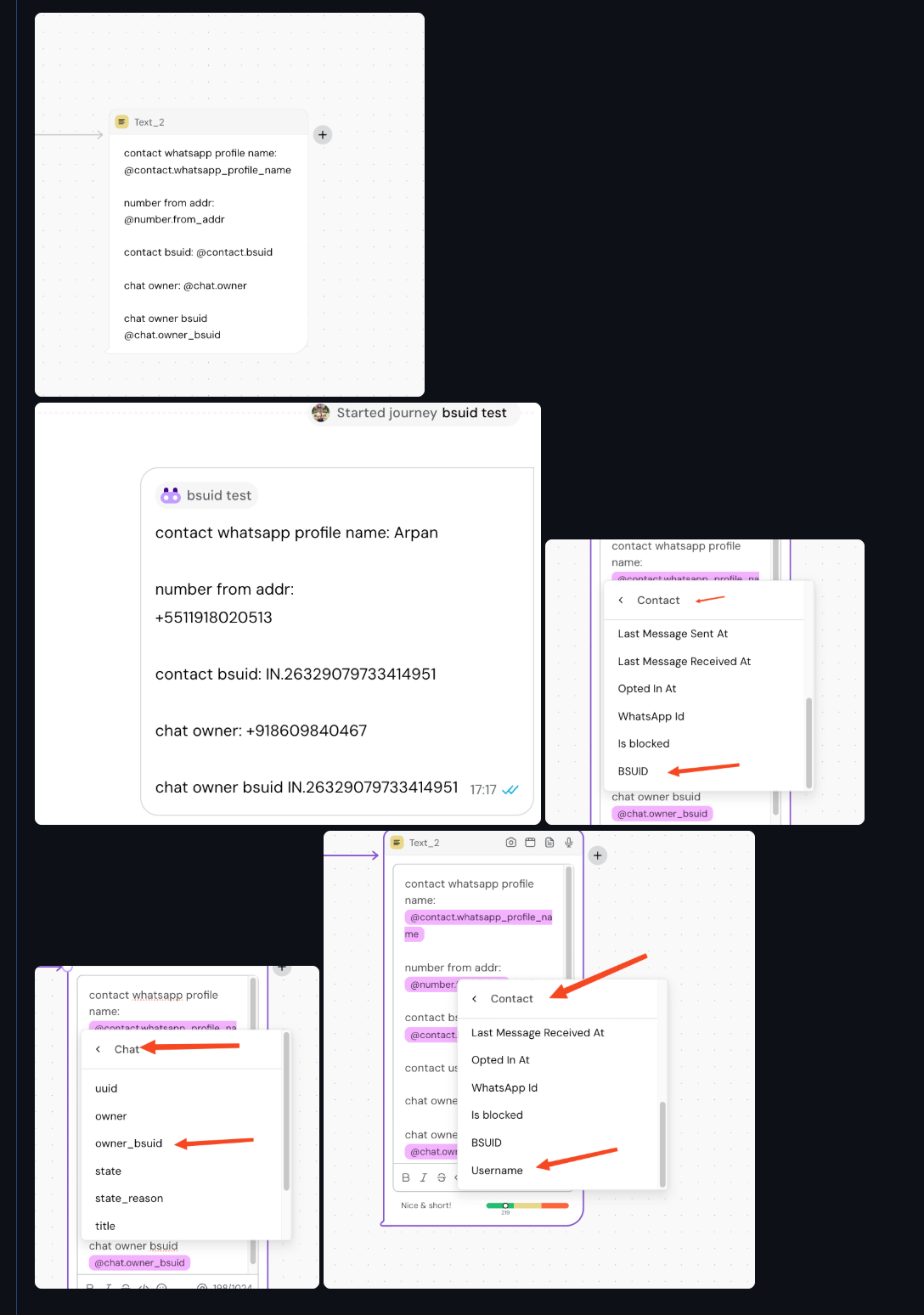
2.1 New Contact Fields
Two new expressions are available in journeys:
Expression | Type | Description | Example value |
| string | The user's BSUID | IN.26329079733414951 |
| string | The user's WhatsApp username | @alice_smith |
These are available in the Journey builder under the Contact variables menu.
2.2 New Chat Field
Expression | Type | Description |
| string | The BSUID of the chat owner |
Available under the Chat variables menu.
2.3 Behavior Change for @contact.whatsapp_id
@contact.whatsapp_id remains phone-only. For BSUID-only contacts (users who have hidden their phone number), this expression returns nil.
Action required:
@contact.whatsapp_id should be updated to use @contact.bsuid where appropriate, or add nil checks — see below how.Here's an example expression to check if someone's whatsapp_id is nil:
is_nil_or_empty(@contact.whatsapp_id)
Here's an example of it in use on a Code card:
card CodeBlock_1 do
  user_id = if(is_nil_or_empty(@contact.whatsapp_id), @contact.bsuid, @contact.whatsapp_id)
  text("User id: @user_id")
end
3. Requesting the user's phone number (coming soon)
To collect phone numbers from username-only users, Meta provides a new message type called Request Contact Info.
You can request the user's phone number from multiple places in the product:
Location | |
As a template | 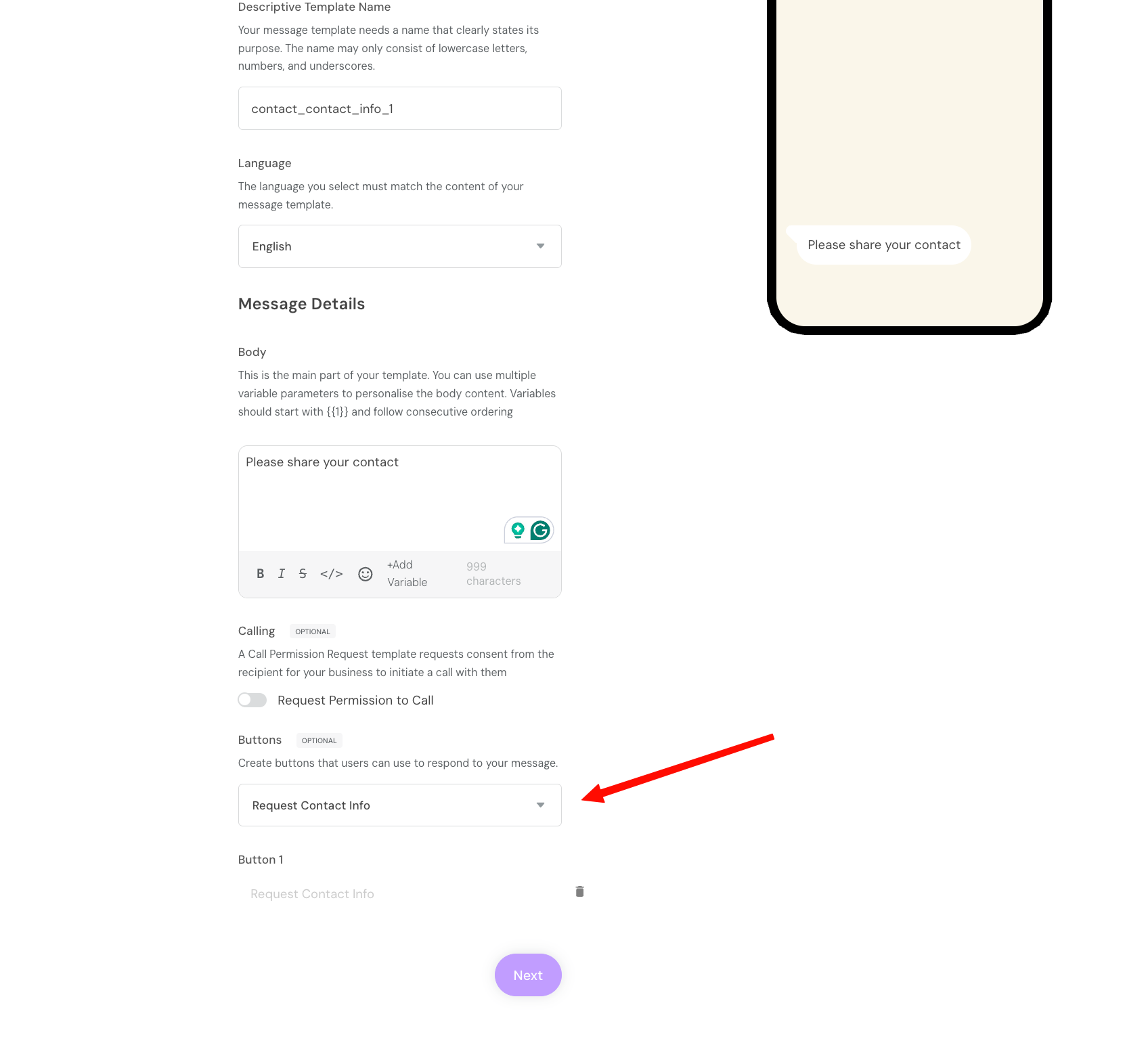 |
From the inbox | 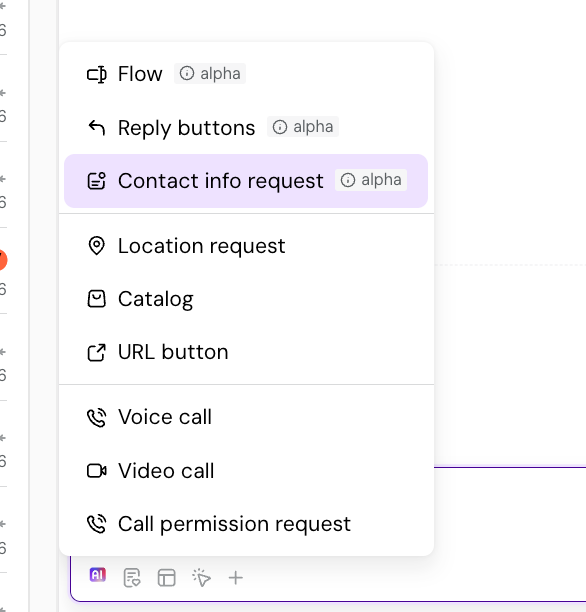 |
From journeys | 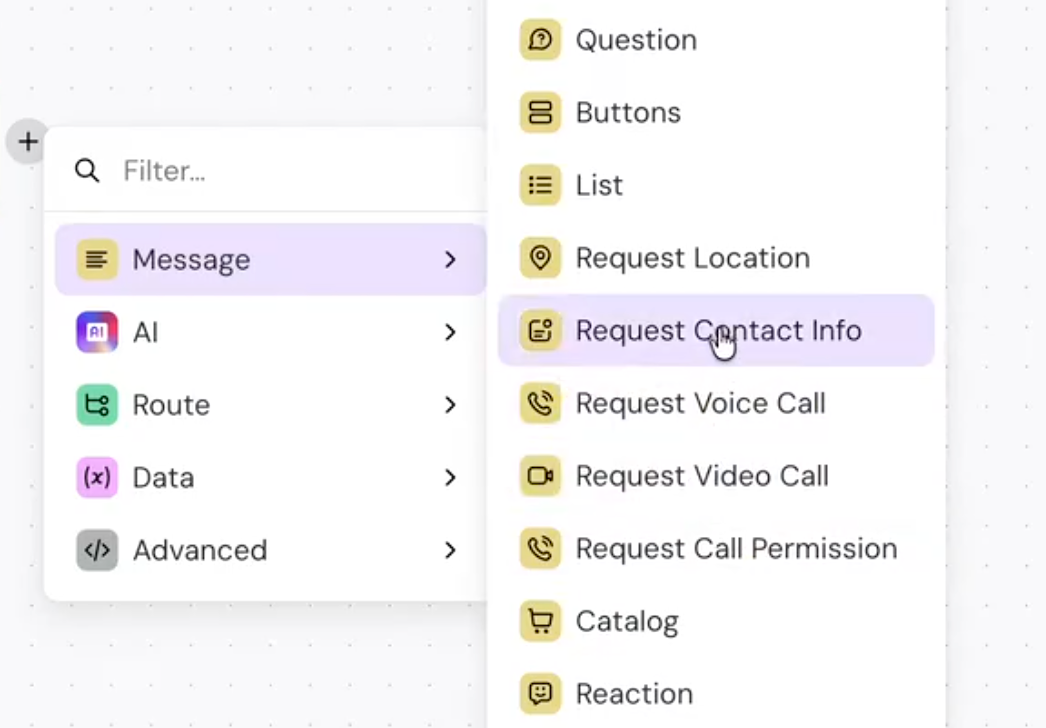 |
The result is always the same: you get access to the user's phone number.
4. Authentication Templates (OTP)
Authentication templates cannot use BSUIDs. Attempting to send an auth template to a BSUID-only contact returns Meta error code 131062. A phone number is required.
This applies to all authentication template types:
- One-time passwords (OTP)
- One-tap authentication
- Zero-tap authentication
- Copy code authentication
These errors will show up in the journey logs or the inbox when trying to send an auth template to a contact without a phone number:

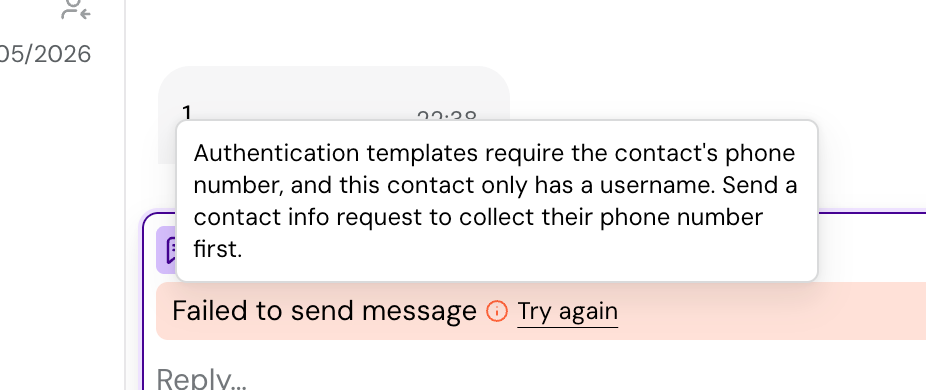
To send authentication templates, you need to first collect the user's phone number by using the Request Contact Info message mentioned earlier on this article.
5. BigQuery / Data Warehouse Changes
5.1 New Columns
The following new columns are automatically exported to BigQuery:
Table | New Column | Type | Description |
contacts | bsuid | STRING | Business-Scoped User ID |
contacts | username | STRING | WhatsApp username |
messages | from_bsuid | STRING | BSUID of the message sender — inbound messages only, NULL on outbound |
messages | urn_bsuid | STRING | BSUID of the customer on either side of the message (sender for inbound, recipient for outbound) — the BSUID counterpart of the existing urn_phone_number; use this for join queries |
chats | owner_bsuid | STRING | BSUID of the conversation owner |
5.2 Nullable Phone Fields
For BSUID-only contacts (users who have hidden their phone number), the phone-based columns will be NULL:
Column | Behavior for BSUID-only contacts |
contacts.urn | NULL (was +phone) |
messages.from_addr | NULL (was phone number) |
messages.urn_phone_number | NULL for both directions (inbound: no from_addr to derive from; outbound: no phone recipient to derive from) |
chats.owner | NULL (was phone number) |
5.3 Impact on Existing Queries
Queries that JOIN on phone-based fields will silently return no rows for BSUID-only contacts. You must update JOINs to use BSUID fields as well.
(Note: urn_phone_number and urn_bsuid are denormalized columns on the messages table that normalize the customer's identifiers across directions. urn_phone_number: from_addr for inbound, addressees[0] for outbound — NULL when the phone is unavailable. urn_bsuid: sender's BSUID for inbound, the conversation's BSUID for outbound.)
Before (phone-only JOIN — breaks for BSUID-only contacts):
-- Fetch all messages for a contact (only accounts for phone number)

SELECT m.*, c.details

FROM messages m

JOIN contacts c ON m.urn_phone_number = c.urn
After (phone + BSUID JOIN):
-- Fetch all messages for a contact (accounts for both phone number and bsuid)

SELECT m.*, COALESCE(cp.details, cb.details) AS details

FROM messages m

-- Messages can be linked their contact by either phone OR bsuid OR both

LEFT JOIN contacts cp ON m.urn_phone_number = cp.urn

LEFT JOIN contacts cb ON m.urn_bsuid = cb.bsuid

-- Optional: only keep messages that matched a contact

WHERE cp.urn IS NOT NULL OR cb.bsuid IS NOT NULL
New filtering capabilities:
-- Find all BSUID-only contacts (no phone number)

WHERE contacts.bsuid IS NOT NULL AND contacts.urn IS NULL

-- Filter by specific BSUID

WHERE contacts.bsuid = 'US.13491208655302741918'

-- All messages exchanged with a specific BSUID user (both directions)

WHERE messages.urn_bsuid = 'US.13491208655302741918'

-- Filter by username

WHERE contact.username = 'alice_smith'
We suggest you get started as soon as possible on making your systems make use of the new BSUID and resilient to users who chose to hide their phone number.
If you have questions in the meantime, reach out to us. We're here to help.