You need opt-in to initiate messages
 Updated
by Neelke Stadler
All messages initiated by organisations via WhatsApp require user opt-in. Here’s what you need to know.
Before you start chatting to users on your new WhatsApp chat service, you’ll have to ensure that they’ve opted-in to receive messages from you via this platform. If you don’t receive opt-in from your users, you stand to lose your WhatsApp number, so make sure you’re 100% familiar with what’s required. It’s also your responsibility as an organisation to safely store your user opt-ins.
Note, however, that you don’t need user consent if your service is entirely based on session messages. Many organisations start off like this, but soon discover instances where it’s important to re-engage with users outside of the 24-hour window period. Even if your service has a 100% pull-based strategy, you need to make sure you understand the opt-in policy.
A simplified opt-in policy
Overtime WhatsApp has simplified their opt-in policy to make it easier for users to receive helpful information from organisations. There are three rules you need to adhere to:
- Your organisation must make it clear that the user is opting-in to receive messages from you via WhatsApp.
- You must clearly state the name of the organisation that the user will be receiving messages from.
- You must comply with the local, applicable law.
Collect opt-in wherever is best for your users
It’s up to you where you get user opt-in. This will ultimately depend on what works for your users. For example, users can give their consent via:
- A WhatsApp thread
- Your website
- An SMS short code
- Interactive voice response (i.e. where a computer does the talking and a user gives consent via their phone’s keypad)
- A customer-service call
- In person
- During a transaction process
- A messenger bot
- Ads that click to WhatsApp
- A QR code
The example below shows you how you can get opt-in during a WhatsApp conversation with a user:
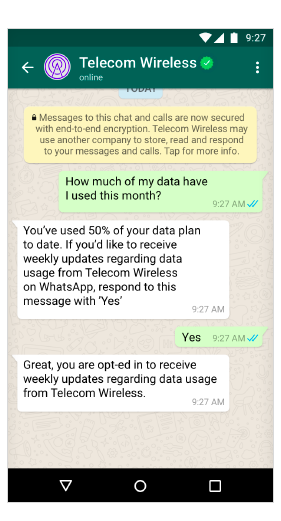
Don’t forget the rule of thumb that we shared in our rules of engagement article: let the user drive the journey. To learn how to get user consent in Turn.io, continue reading here.